Projects and progress claims

Progress claims and retention for subbies, from $99 a month

Run staged work as a project: quote it by stage, price variations, claim every month with your state's security of payment wording, track the builder's payment schedule and get your retention back. It all comes with the Connected plan, one price for the business with up to 20 active crew included.

30 days free with everything included. Up to 20 active crew a month are included on every plan.

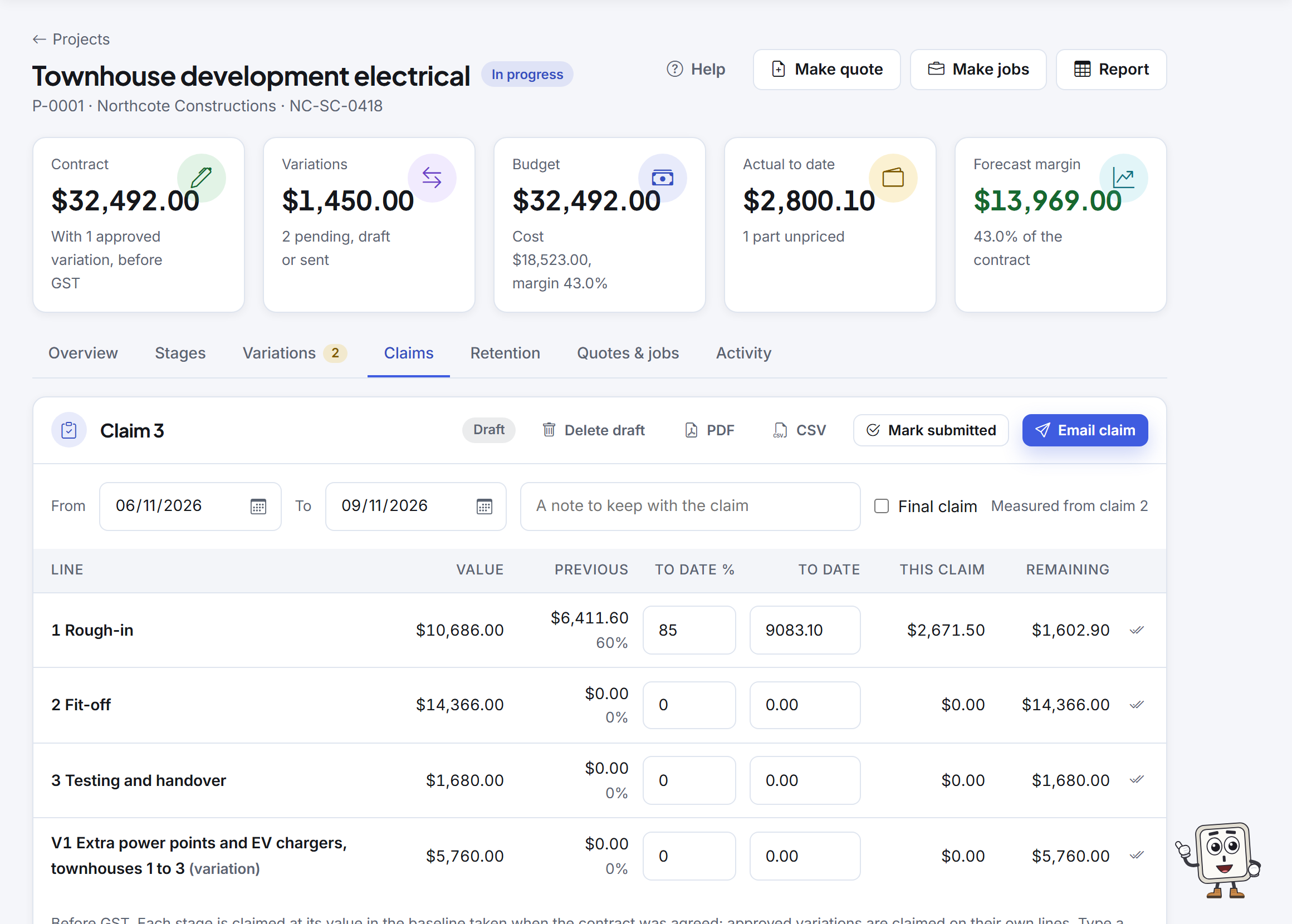
A draft progress claim: each stage with its value, claimed before, done to date and this claim

Why it matters

Project claims without a per-user price

Ascora and Tradify price each user, and NextMinute prices by the number of users. Crewzy puts projects, claims and retention on a plan priced once for the business, and the crew on site come included up to 20 a month.

From the quote to the final claim

Stages, the quote and the contract

  • Build the project as stages, priced from your price list.
  • Make quote prints a quote grouped under stage headings. Once it is accepted, it becomes the contract the claims are measured against.
  • Make jobs from stages, so time, parts and supplier bills land on the stage, and see budget against actual as the work goes.

Quotes and the contract

Variations, signed before you do the work

  • Number each change V1, V2 and so on, priced line by line, with who directed it and any extra time.
  • Send it for approval: the customer or builder signs it on a link, or you record the builder's decision yourself.
  • The crew raise one from the phone with photos, and never see a price. Variations raised late are flagged against your notice period.

How variations work

Progress claims with your state's wording

  • One line for each stage and each approved variation. Enter what is done to date as a percent or an amount, and the claim takes off what you claimed before.
  • Retention is held at your contract's rate, up to its cap, and the totals read the way builders expect.
  • Set the project's state and the claim prints that state's security of payment statement.
  • When you are registered for GST the claim is your tax invoice, numbered in your invoice series and in your books like any invoice. Builder issues RCTIs? Claims become payment claims instead.
  • Email the claim, or mark it submitted with the portal reference. Home tells you a week before each claim day.

How progress claims work

Payment schedules and what is late

  • Record the builder's payment schedule against the claim, with the reasons for paying less, line by line if they give them, and mark it disputed if you do not accept it.
  • See when the schedule and payment are due, as a guide, in New South Wales, Victoria, Queensland, Western Australia, Tasmania and the ACT; elsewhere from your contract terms.
  • You are told when a schedule is late, a payment is overdue or an RCTI has not arrived.

Payment schedules and RCTIs

Retention you actually get back

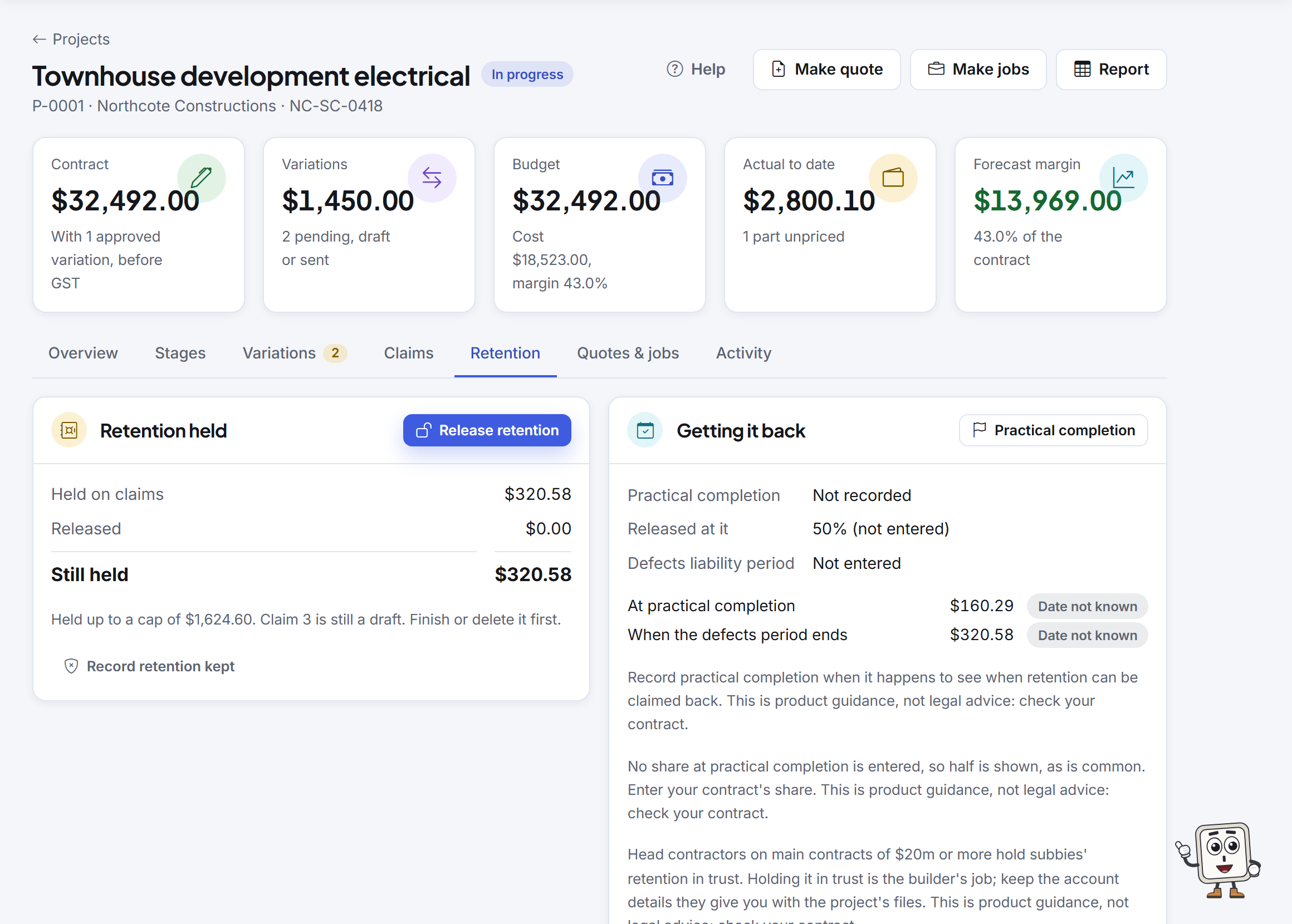
  • A ledger of what the builder holds from each claim, what you have claimed back and what they kept.
  • Record practical completion and the defects period, and you are reminded 30 days before each part can be claimed, and on the day.
  • Release retention on a claim of its own, as a tax invoice for the retention plus GST.

Retention held and released

The final claim and closing the project

  • Mark your last claim as the final claim. In Victoria the claims tab warns you a month before six months after practical completion.
  • Closing the project lists what is left: a draft, unpaid claims, retention still held.
  • Claim history and retention ledger reports, for a project or the whole business, with CSV.

The final claim and closing a project

The builder uses a portal? Upload the CSV

Many builders take claims through their own portal. Download the claim's lines as a CSV and upload them there.

  • Each line with its value, what was claimed before, the percent and value to date, this claim and what remains, with a total row.
  • Then mark the claim submitted with the portal reference, and the next claim is measured from it.
  • The PDF of the claim as it went out is filed under Claim files, where you can add the builder's acknowledgement.

Crewzy does not connect to builders' portals; the CSV is for you to upload.

The Retention tab: what is held on claims, released and still held, and the ledger

Which plan has it

Projects on each plan
PlanPriceProjects and claims
Base$49/month$490/yearNZ$61/monthNZ$610/yearTry them free on the trial
Connected$99/month$990/yearNZ$123/monthNZ$1,230/yearUp to 5 active projects, with everything on this page
Unlimited$249/month$2,490/yearNZ$311/monthNZ$3,110/yearAs many active projects as you need

Prices include GST. A closed project no longer counts as active. See everything on each plan.

Security of payment, in plain words

Every state has its own deadlines for the payment schedule and for payment. Our guide sets out each one with a link to the official page.

General information, not legal advice. The wording and dates in the app are guides and have not been reviewed by a lawyer: check your contract.

Free 30-minute setup call, and we'll bring your data across

From Tradify, Fergus, ServiceM8 or a spreadsheet. On the call we set up your business, price list and crew with you, and answer your questions.
Export your customers, sites, jobs, price list and unpaid invoices as CSV files and we bring them in with you. Unpaid invoices come across as the balance still owed. Photos, notes and forms do not export in bulk from most apps, so they stay behind.

To book, email hello@getcrewzy.com with a day and time that suits and the app you are moving from.

Put your next claim through it

30 days free with everything included. Up to 20 active crew a month are included on every plan.

Free 30-minute setup call, and we'll bring your data across from Tradify, Fergus, ServiceM8 or a spreadsheet.